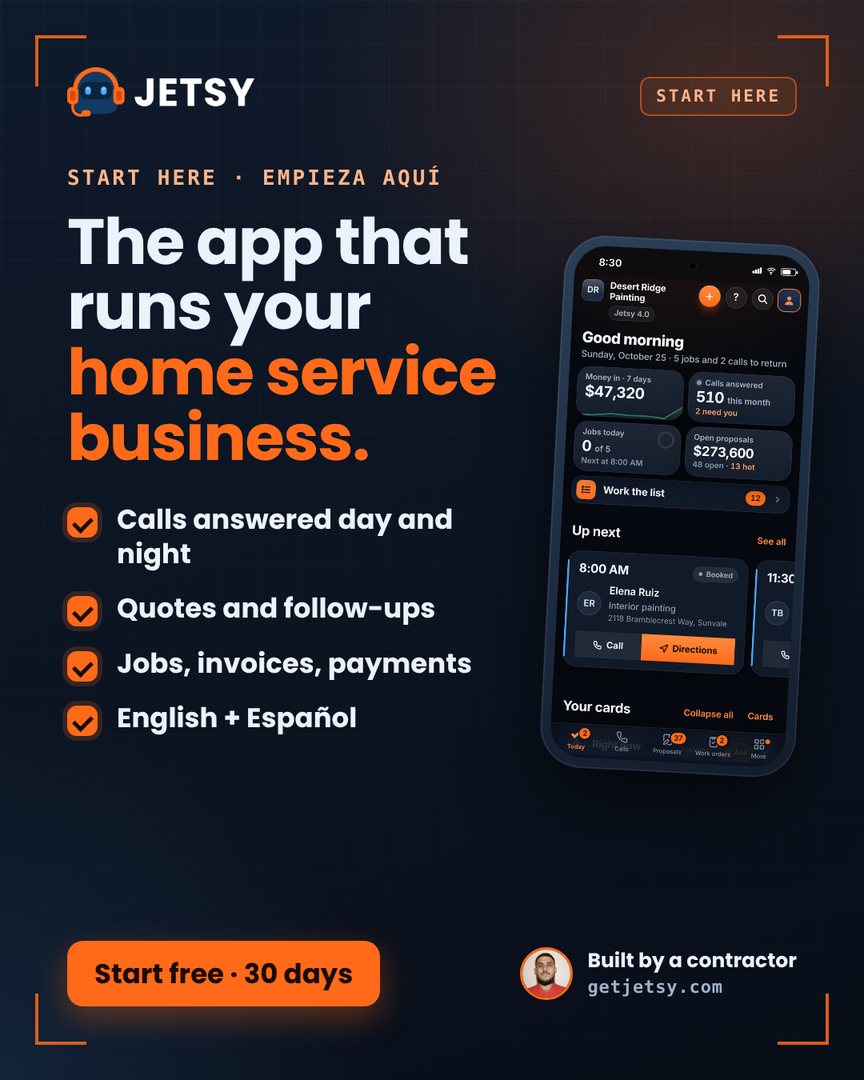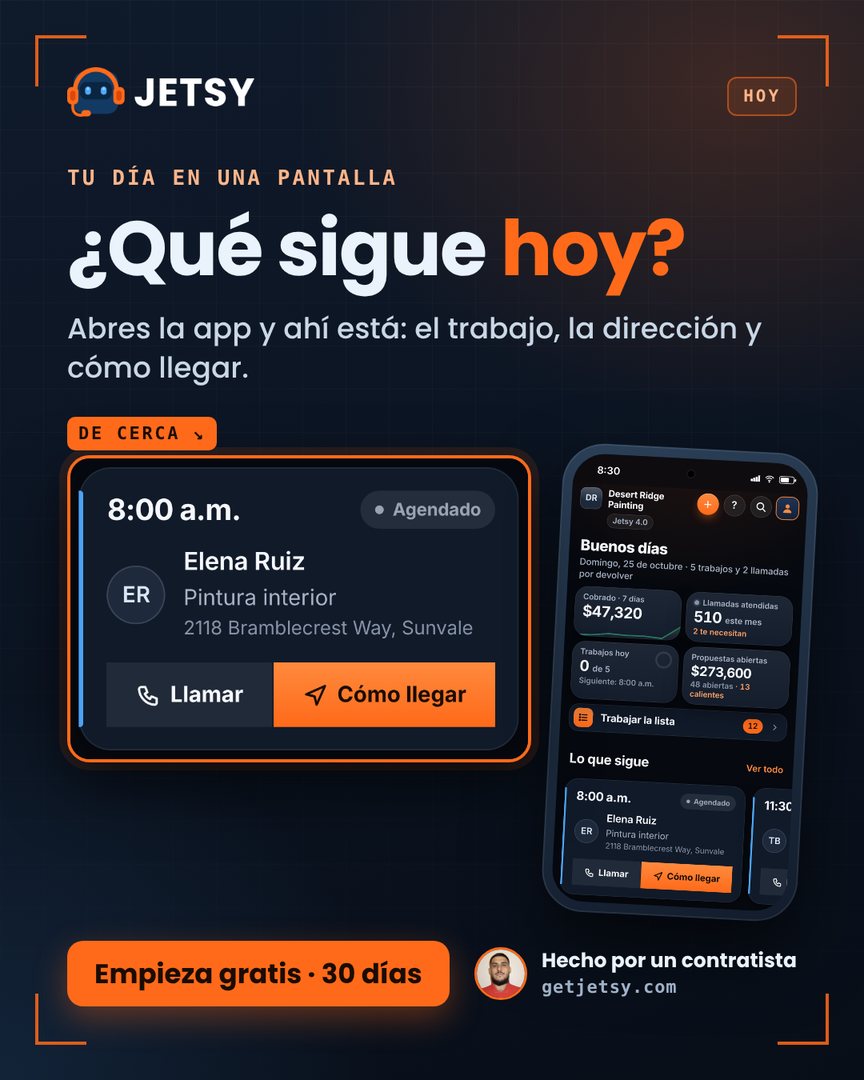
Everything Jetsy does. With the real screens.
Grouped the way you run a job: win the work, do the work, get paid, run the business, your crew and the phone. Every screen on this page is the real app, and every feature has a link that opens it live in a sample company. No sign-up, no card.
Every plan has everything in the plans before it, so a feature marked Jetsy 1.0 is in all four. Month to month. No contract. No setup fee.
Catch every lead. Quote it right. Look good doing it.
From the first call to the quote in your customer’s inbox.
-
Proposals that don’t slip
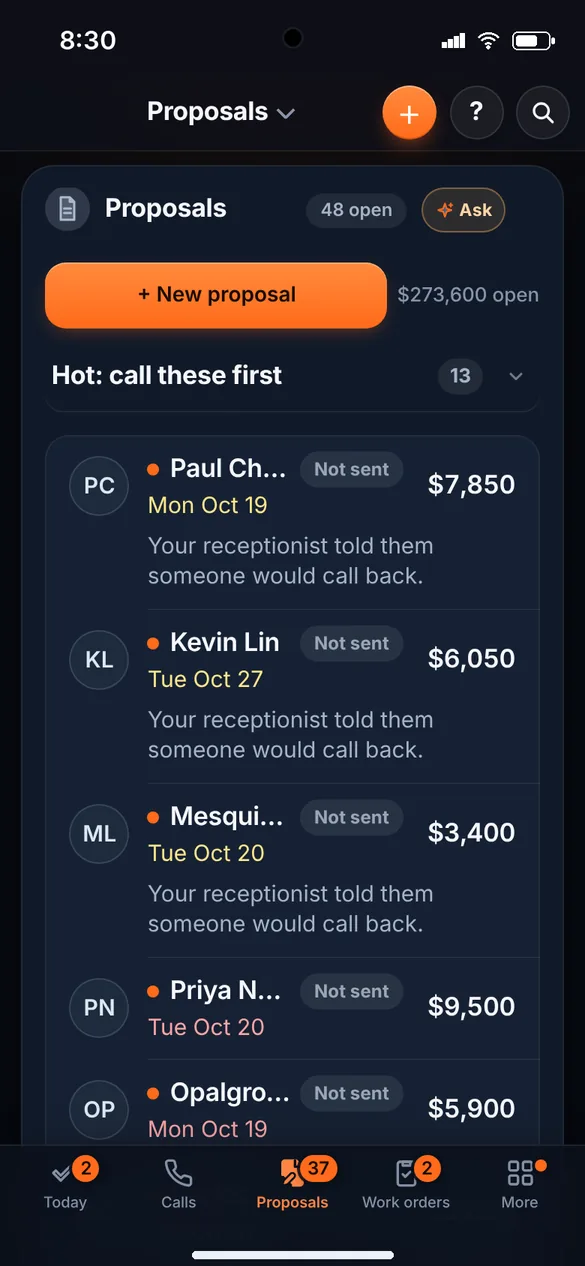
Every call, form and proposal in one list on the Proposals tab, hot ones first, with who is waiting on a call back or a yes. + New proposal writes one, and Save for later keeps it there.
Jetsy 1.0 · $25 See it live → -
A quote already written for your trade
Pick your trade when you sign up and the words, the services and the starting quote fit it. You add your prices and send it.
Jetsy 1.0 · $25 See it live → -
Price book
Type your hourly rate, how fast each line goes, what material costs and the margin you want, once. Every job is priced the same way, and a price under your margin turns amber.
Jetsy 1.0 · $25 See it live → -
Proposals your customer signs
Proposals with your logo, sent by email. Your customer signs on their phone with a finger, or prints the page. Your deposit terms go on it, and each one waits on the Proposals tab, Sent or Not sent, until they say yes.
Jetsy 1.0 · $25 See it live → -
Optional add-ons on proposals
List your extras with their prices. The customer checks the ones they want on the proposal page and sees the total, the deposit and the balance change before accepting. What they pick lands on the job and its invoice.
Jetsy 1.0 · $25 See it live → -
Three prices on one quote
Give a customer your price, a better one and the best one. They pick, and you don’t have to talk them into it.
Jetsy 1.0 · $25 See it live → -
Online booking page
A link customers use to pick a service and an open time. It lands on your calendar.
Jetsy 1.0 · $25 See it live → -
Five stars after the job New
The after-the-job message asks “How did we do?” with one tap to five big stars, by email on Jetsy 1.0 and by text from Jetsy 2.0. Four or five stars gets a Post it on Google button. One to three asks what went wrong and buzzes you first, before they ever reach Google.
Jetsy 1.0 · $25 See it live → -
Come-backs become leads by themselves New
A repaint in 5 years, a service every spring: pick the repeat on a finished job and when the day comes the customer lands on your Proposals tab, marked Coming back, with the address and what you did last time. Nothing is sent to them. It is your lead to work.
Jetsy 1.0 · $25 See it live → -
A chat box for your own website New
One line of code on your site, in your color, with your name. A visitor types what they need and their number, in English or Spanish, and it lands on your Proposals tab marked “Website chat”, with a buzz.
Jetsy 1.0 · $25 See it live → -
A free website, built in 5 minutes New
Answer a few questions and it’s live, with free hosting on your own your-name.getjetsy.com: your services, towns, hours, photos, your Google reviews and a request form that lands on your Proposals tab, in English and Spanish, in your own color. A report shows visits, calls and requests. Every plan.
Jetsy 1.0 · $25 See it live →
Book it, run it, finish it.
Calendar, routes, work orders and photos, from the first visit to the last photo.
-
Work orders
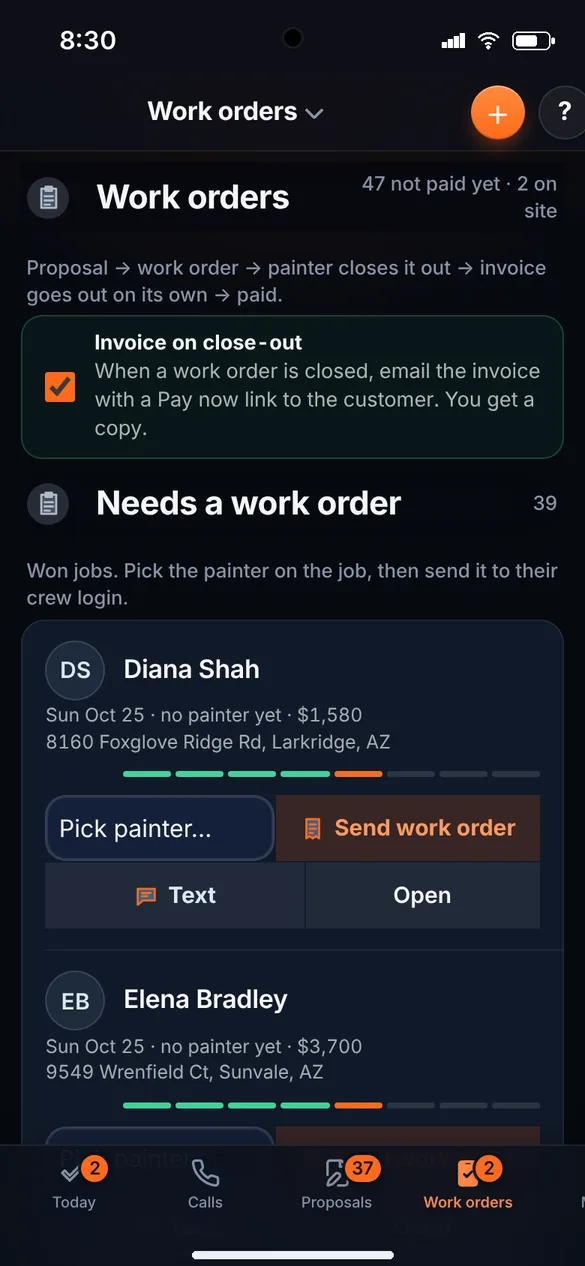
A won job becomes a work order. Close it and the invoice can go out by itself, with a Pay now link and a copy to you.
Jetsy 1.0 · $25 See it live → -
Google Calendar, both ways New
One tap adds your Jetsy schedule to Google Calendar (jobs that take several days and jobs with a start time included). Paste your Google calendar’s secret address and its busy times keep the booking page and the pick-another-day link from offering a time you are not free.
Jetsy 1.0 · $25 See it live → -
Calendar
Everything booked, by week, by month or as a list of the next 14 days. One tap adds a job to your phone’s calendar.
Jetsy 1.0 · $25 See it live → -
Routes and repeat customers
Repeat every week, every 2 weeks, monthly or every 3 months. Each day’s stops go in driving order, one tap to the next one, and you mark each Done, Not home or Skip.
Jetsy 1.0 · $25 See it live → -
Day-before reminder texts for route customers New
Turn on Reminder the day before and every route visit due tomorrow gets one text from your own number: “Hi Ana, this is Happy Brush. A reminder that we are coming tomorrow, Thursday, Oct 15.” Weekly, monthly, moved and one-time visits all count. Never twice.
From Jetsy 2.0 · $50 See it live → -
A live page for every customer
Each customer gets a private link with your logo. They watch their job go from Booked to On the way, Working, Done and Paid, see their photos, sign a quote, pay an invoice and ask to book again.
Jetsy 1.0 · $25 See it live → -
Your customers’ thermostats, with your name on them New
Connect a customer’s smart thermostat (Honeywell Home, ecobee, Sensi and more). They change the temperature from their page with your logo, and Jetsy tells you when the AC isn’t keeping up, the house gets too hot or too cold, the thermostat goes offline or the filter is due. One tap turns it into a service call. Each connected thermostat is $7 a month; the demo is free.
Jetsy 1.0 · $25 See it live → -
Job photos
Before and after on every job, printed on the quote, the invoice and the proposal. Up to 24 photos a job.
Jetsy 1.0 · $25 See it live → -
Chemical log and pesticide use report New
For pest control and lawn care: your products with EPA numbers, a license on each applicator, “Chemicals used” on every job and route visit (the crew app too), and the report your state inspector reads — by month, product and county — with a CSV and a printable page. Not legal advice; check your state’s rules.
Jetsy 1.0 · $25 See it live → -
Forms and checklists on each job
Build a form (checkboxes, text, numbers, yes/no, dates, photos, a signature) or start from a ready-made one, and attach it to a job or a job type. The crew fills it on the phone, required items must be done before Job finished, and you print or share a clean copy for the customer.
Jetsy 1.0 · $25 See it live → -
Several properties and the equipment at each
One customer, more than one address: a home, a rental, a second building, each with its gate code and access notes the crew sees on the job. The equipment at each one (brand, model, serial, install date, warranty end, photos) keeps its own service history, and a warranty ending soon is flagged.
Jetsy 1.0 · $25 See it live → -
Inventory and purchase orders
Parts and materials with a part number, unit cost, reorder point and supplier. Stock at the shop and on each truck. The crew records what they used on a job from their truck and you add it to the invoice at the price-book price. Low stock is listed once a day, and purchase orders go to suppliers by email or print.
From Jetsy 3.0 · $100 See it live → -
No double-booking
Tells you when the same person is booked on two jobs the same day.
Jetsy 1.0 · $25 See it live → -
What each job kept
Price, materials, labor and what you kept on every job, not an average. The losing jobs stop hiding.
Jetsy 1.0 · $25 See it live → -
Automatic messages
A reminder before a visit, a review ask after the job, a nudge on unpaid invoices and a quote follow-up. All off until you switch them on. Never to anyone who said STOP, never before 8am or after 8pm.
Jetsy 1.0 · $25 See it live → -
Jobs that take more than one day New
Pick how many days on the job (up to 10) and it shows on Today, the calendar and the dispatch board for every day it covers — day 2 of 3, right on the card.
Jetsy 1.0 · $25 See it live → -
A pick-another-day link on the reminder New
Turn it on and the day-before reminder ends with “Need another day? Pick one:” and a link to your open times. The customer taps one, the job moves, you get one buzz, and the job says “Moved by the customer”. No sign-in for them; the link expires.
Jetsy 1.0 · $25 See it live →
Send the invoice. Get the money. Chase the rest.
Card money goes straight to your own bank. You connect your own Stripe account once, and Stripe’s card fee applies.
-
Invoices
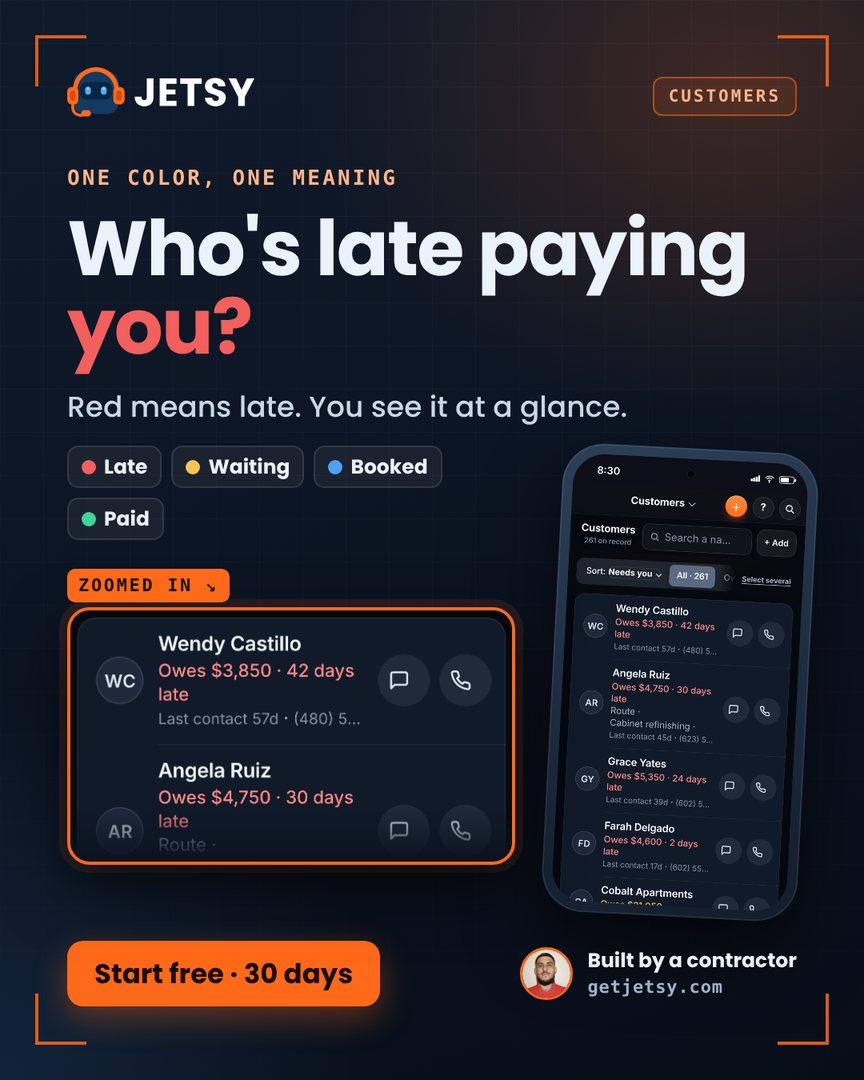
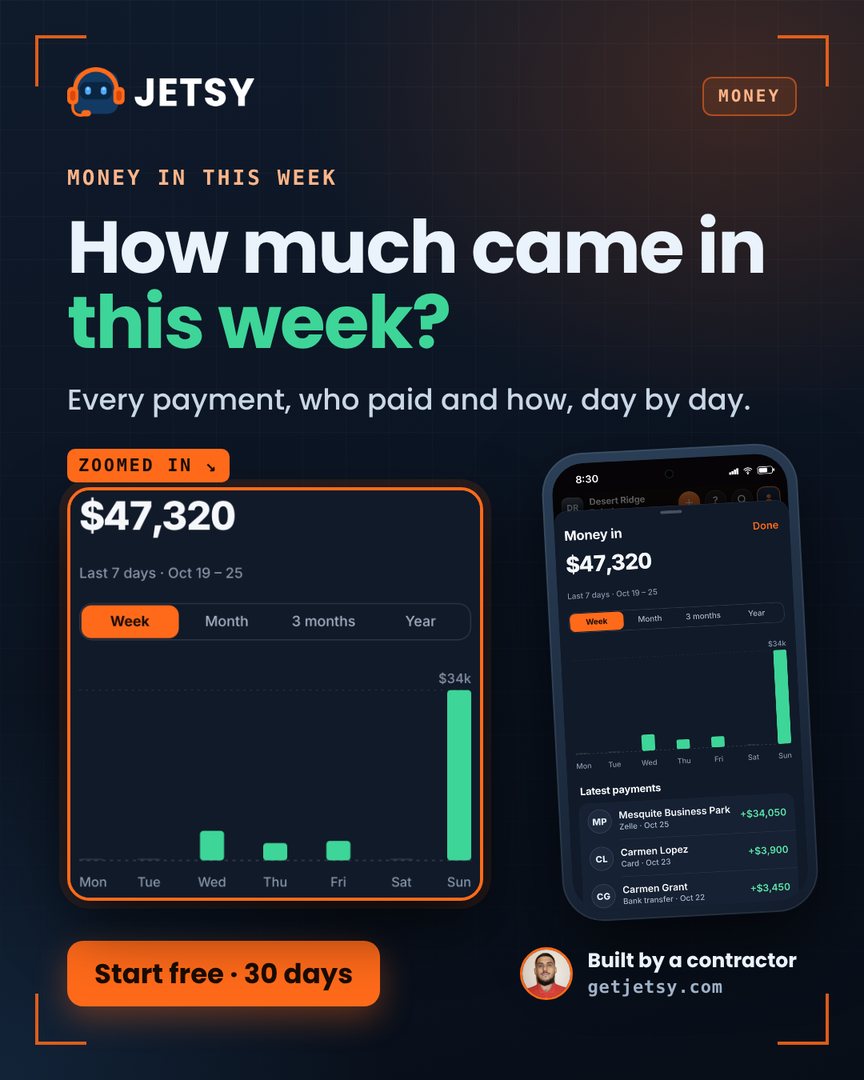
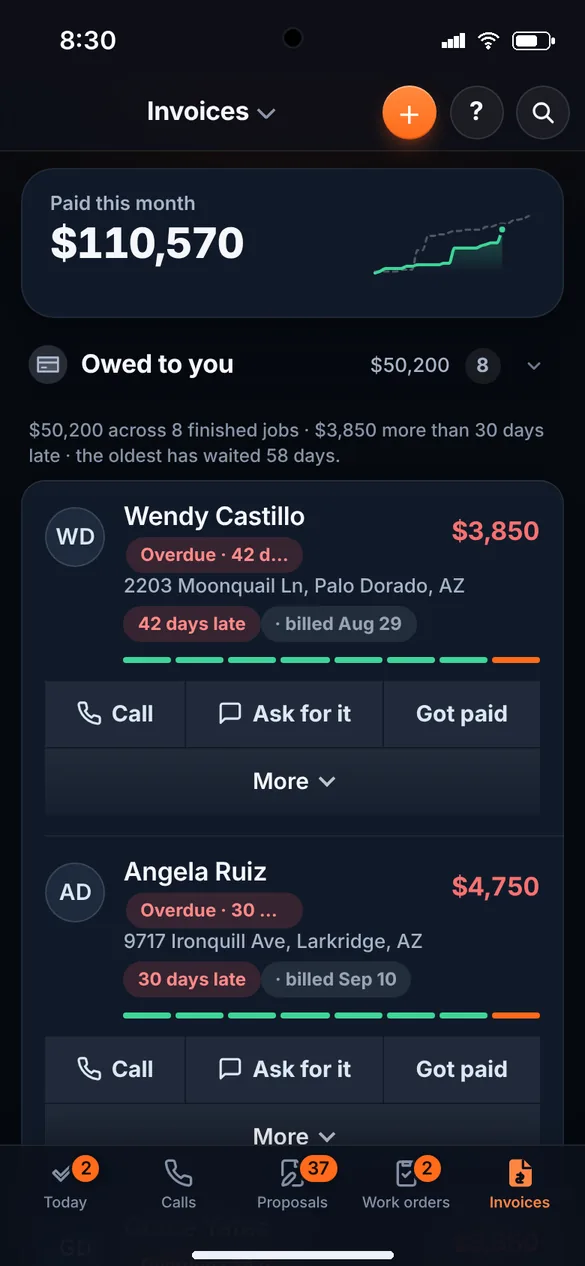
Who owes you, oldest first. A late invoice shows how many days late, and you call, ask for it or mark it paid from the same row.
Jetsy 1.0 · $25 See it live → -
Card payments
A Pay now button on every invoice. The money goes straight to your own bank.
Jetsy 1.0 · $25 See it live → -
Tap-to-pay card reader New
Pair a Stripe smart reader (bought from Stripe) and tap Charge on the reader from any job that owes money. The customer taps, inserts or swipes; the payment lands on the job by itself and a receipt goes out. Your own Stripe, your bank.
Jetsy 1.0 · $25 See it live → -
Card on file and auto-bill New
A repeat customer saves a card once on a private page (their own Stripe page; Jetsy never sees the number). Turn on auto-bill with a limit you set, and a finished job is paid by itself an hour later, with a receipt to them and one buzz to you. Over the limit, or a declined card, and you get a buzz with a pay link instead.
Jetsy 1.0 · $25 See it live → -
Sales tax report New
The quarter’s tax by month and by rate, invoiced and collected, with a CSV for your bookkeeper. Not tax advice — it is your own numbers, added up.
Jetsy 1.0 · $25 See it live → -
Deposits
Ask for a deposit before you start. Your customer pays it by card, and it goes straight to your bank.
Jetsy 1.0 · $25 See it live → -
Change orders
When the job grows, add a change order. It goes on the same invoice.
Jetsy 1.0 · $25 See it live → -
Payment terms, late fee and customer statements
Due on receipt, Net 15, Net 30 and more, for the whole business, one customer or one invoice, with the due date on the invoice. A late fee you turn on if you want it. Every customer gets a statement page with every open invoice and one Pay all button.
Jetsy 1.0 · $25 See it live → -
Maintenance agreements billed on their own
Set up a plan: what is included, the price, how often it bills, visits a year. Send it, the customer signs on their phone and saves a card, and Jetsy charges it when due, puts each charge on Invoices and schedules the visits on Routes. Pause or cancel from the card.
Jetsy 1.0 · $25 See it live → -
QuickBooks export
Customers, invoices and payments as files for your bookkeeper. The invoice file is made for QuickBooks Online’s import. Nothing is sent anywhere.
Jetsy 1.0 · $25 See it live →
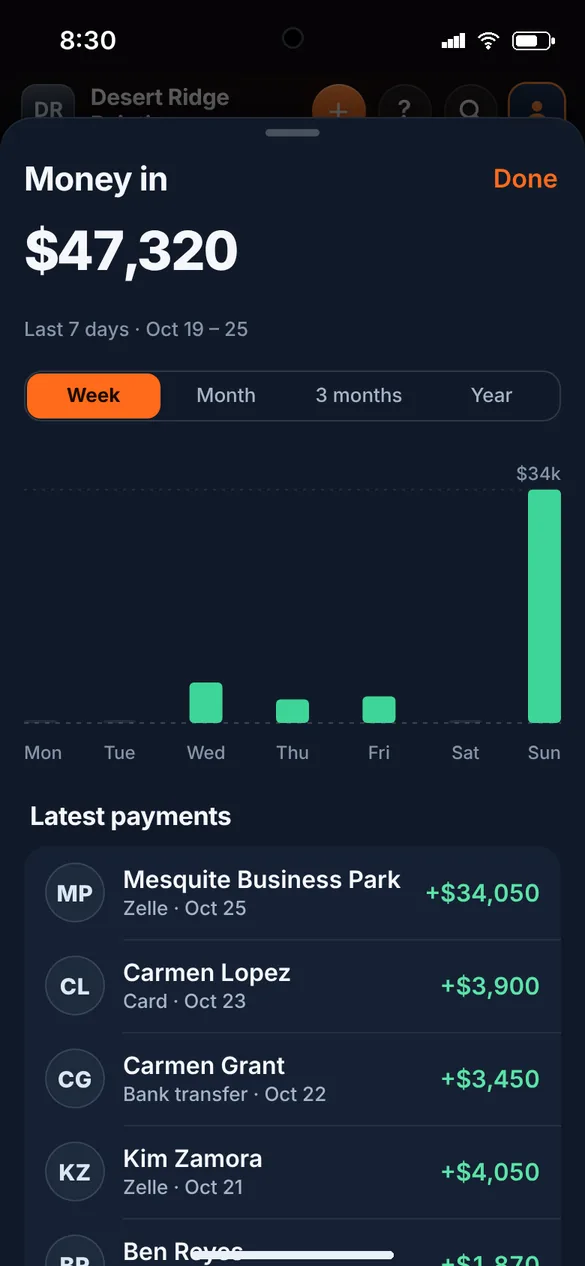
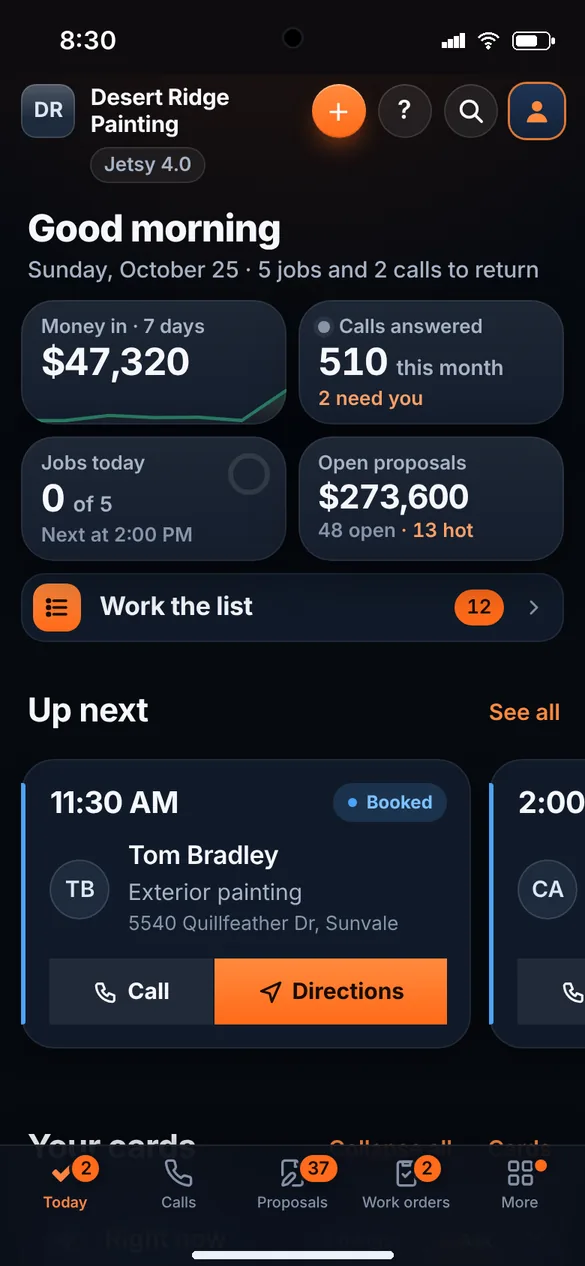
One screen for the whole company.
What needs you today, where the money is, and who your customers are.
-
Today
What needs you, the money and the day. Past customers who went quiet show up too, biggest spender first.
Jetsy 1.0 · $25 See it live → -
One Follow up list
Every reason to call or text someone, on one list: a lead waiting, a quote with no answer, a visit with no quote, money due, a review to ask. Each row has Call, Text, Done and Snooze.
Jetsy 1.0 · $25 See it live → -
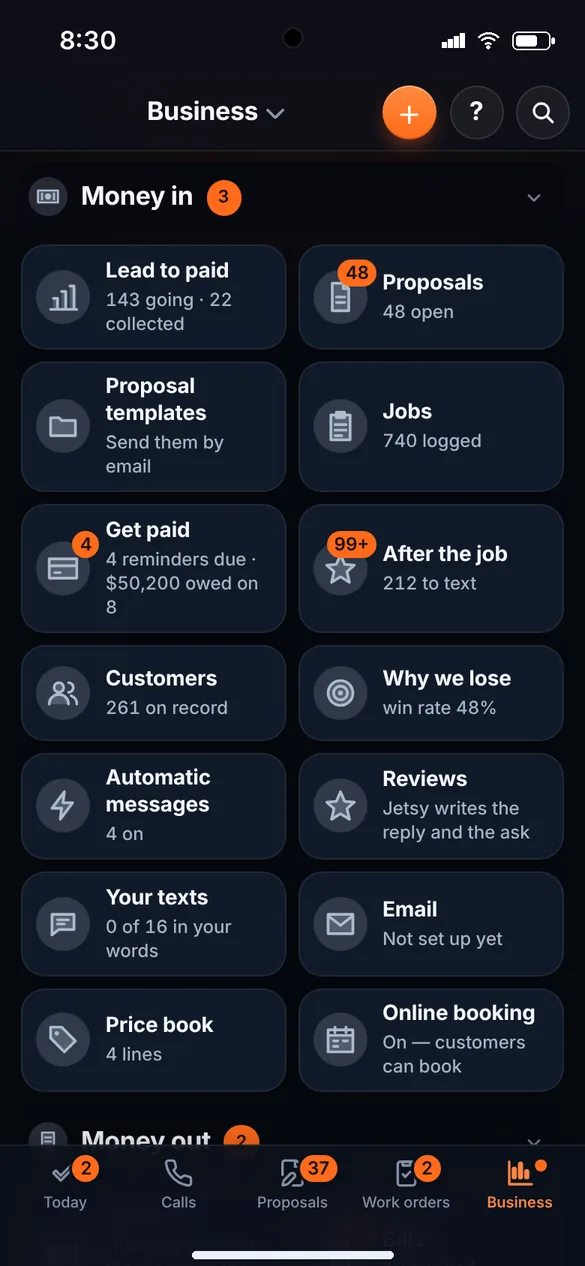
The Business screen
Money in, money out and your crew, as tiles you tap open.
Jetsy 1.0 · $25 See it live → -
Customers
Everyone you have worked for, with their jobs, what they spent and their number. Tap to call or text. Jetsy spots the same customer entered twice.
Jetsy 1.0 · $25 See it live → -
Every customer’s story in one timeline
Every call, text, quote, invoice, payment, photo and note on one customer, the last contact at the top, and one button that does the next thing.
Jetsy 1.0 · $25 See it live → -
Customer tags
VIP, HOA, Commercial, Slow payer, or your own words. Sort and filter the list by them.
Jetsy 1.0 · $25 See it live → -
Import customers
Bring your whole list in from another app, QuickBooks, Google Contacts, your phone’s contacts or a spreadsheet. Jetsy matches the columns, finds the customers already there and only fills in what is missing. An import can be undone.
Jetsy 1.0 · $25 See it live → -
Find
One box finds any customer, job or lead, and takes you to any screen.
Jetsy 1.0 · $25 See it live → -
What changed, with Undo New
A card on Today shows who changed what, newest first: “Job Ana Ruiz — Status: Quote → Won”, with an Undo on every line. Undo refuses politely if that thing has moved on since. Thirty days kept.
Jetsy 1.0 · $25 See it live → -
Your own fields New
Gate code, paint colors, the dog’s name, the HOA: add a field once and it is on every customer or job card, with a box to fill, and it prints on the quote and the invoice.
Jetsy 1.0 · $25 See it live → -
Files kept on a customer New
A photo of the signed contract, the permit, the color sheet: keep them on the customer, open them from the card, and they are there next year.
Jetsy 1.0 · $25 See it live → -
Voice shortcuts New
Say “New Jetsy lead,” “What’s on today?” or “Who owes me?” to your phone and hear the answer. Three voice shortcuts with your own key, set up from a link in the app (on iPhone for now). Up to 30 answers a day.
Jetsy 1.0 · $25 -
English and Spanish
The whole app switches with one tap. Your crew reads it their way.
Jetsy 1.0 · $25 See it live → -
On your home screen
Add it to your home screen and it opens like an app, with nothing to install from a store. With no signal it still opens and shows the last copy it had.
Jetsy 1.0 · $25 See it live → -
Download everything
Every customer, job, lead, quote and invoice in files that open in Excel or Google Sheets. Yours to keep.
Jetsy 1.0 · $25 See it live → -
Jetsy Brain
Ask anything about your business, answered from your own numbers.
Jetsy 4.0 · $250 See it live → -
Bank feed
Connect your bank to see what came in and went out, and sort it into categories. It can read. It cannot move a cent.
Jetsy 4.0 · $250 See it live →
Everyone on the same page. Nothing added up by hand.
Your crew signs in on their own phone, so nobody has to be called to find out where to go.
-
Crew and crew pay
Who is on which job, and what each one is owed, worked out job by job with nothing added up by hand.
Jetsy 1.0 · $25 See it live → -
Dispatch board and crew map
A lane for each crew member. Tap a job to assign it or move its day and time, and overlaps show in red. The map shows where the crew is only while they are working with Jetsy open, and stops after their last job of the day.
Jetsy 1.0 · $25 See it live → -
Crew time clock, timesheets and payroll CSV
The crew clocks in, out and on break from the crew app, on a job if they like. You see weekly timesheets per person, fix a missed clock-out, approve a week and it locks, see hours over 40 flagged, and download a payroll file that opens in Excel or Google Sheets.
Jetsy 1.0 · $25 See it live → -
The crew app
They sign in with an invite and a PIN, see the address, the customer’s number and what to do, in English or Spanish, and tap Job finished.
Jetsy 1.0 · $25 See it live → -
Their pay, on their phone
Each person sees what they are owed and taps I got paid when they have been.
Jetsy 1.0 · $25 See it live → -
Crew scorecard New
One row per person from the work already logged: jobs done, callbacks, on time, hours. Pick the month or the quarter. No extra typing.
Jetsy 1.0 · $25 See it live → -
An office assistant’s login
Give your assistant a login. You choose what they can open, starting with the work orders.
From Jetsy 3.0 · $100 See it live →
- 1You pick who is on the job and tap Send work order.
- 2They open their crew page on their own phone: the address, the customer’s number, what to do and what they’re paid.
- 3They tap Job finished. With Invoice on close-out checked, the invoice goes out on its own with a Pay now link, and you get a copy.
A phone that answers when you can’t.
Optional. On a ladder, on a job, at dinner: Jetsy answers in English or Spanish, takes the address and books the visit, and it’s on your board before you get home.
-
Text sooner from a toll-free number New
Registration of your own number can take weeks. Tick one box on the texting sign-up and a toll-free 8xx number, verified in days, carries your reminders and replies in the meantime; replies land in the same inbox, and Jetsy switches back to your number when it is approved.
From Jetsy 2.0 · $50 See it live → -
Business texting, registered from inside Jetsy New
US phone companies only deliver business texts from a registered number. Setup → Texting is one form in plain words; Jetsy registers your number for you, tells you where it stands, and your reminders, review requests and replies go out once it is approved.
From Jetsy 2.0 · $50 See it live → -
Answers every call, day or night
In English or Spanish, with no upcharge.
From Jetsy 2.0 · $50 See it live → -
Takes the address and books the visit
The visit lands on your calendar, and the caller lands on the Proposals tab with their name, number and what they asked about.
From Jetsy 2.0 · $50 See it live → -
Recordings you can play in the app New
Every call the receptionist takes is recorded (the greeting says so; turn it off in Setup if your state needs everyone’s consent). Play it on the call row, scrub, 1.5× or 2×, and watch the transcript light up as it plays. Kept 90 days.
From Jetsy 2.0 · $50 See it live → -
Take messages only, written out New
Switch the receptionist to “Take messages only” for a day off or after hours. Callers hear your message (English or Spanish), their words are written out on the call row and in your buzz, and they land on the Proposals tab.
From Jetsy 2.0 · $50 See it live → -
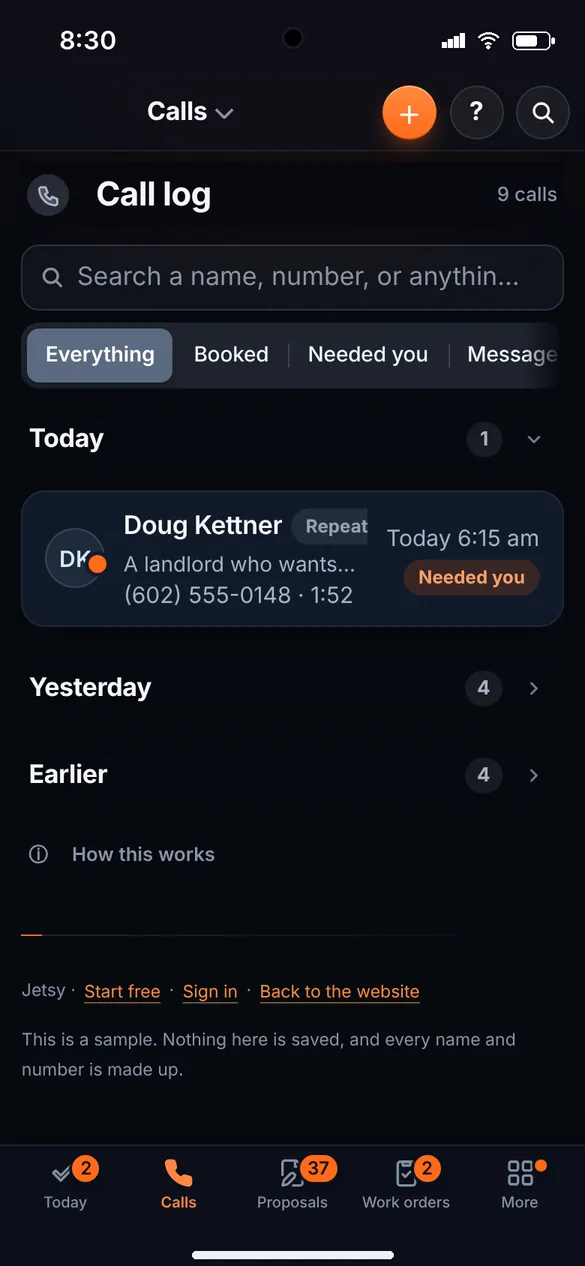
Every call, written up
Who called, what they wanted and what was said, in Calls. Search it: “gate code” finds the call where someone said it.
From Jetsy 2.0 · $50 See it live → -
Keep your own number
Customers keep calling the number they already have. You forward it to your Jetsy number, and most phone companies let you forward only when you are busy or don’t answer, so you get the first shot at every call.
From Jetsy 2.0 · $50 See it live → -
Your minutes
100 call minutes a month on Jetsy 2.0, 500 on Jetsy 3.0 and 1,000 on Jetsy 4.0. After that, 25¢ a minute.
From Jetsy 2.0 · $50 See it live → -
A text inbox, two-way texting in English and Spanish
Customers’ texts to your Jetsy number arrive in one place, matched to the customer, with quick replies in English and Spanish. STOP is always honored and nothing goes out late at night.
From Jetsy 2.0 · $50 See it live → -
A missed call texted back New
Somebody rings and hangs up before you get their name. Within seconds they get a text: “We saw your call but did not catch what you needed. Reply here and we will help.” Once per number per day, between 7am and 10pm, in Spanish if they spoke Spanish. You can use your own words.
From Jetsy 2.0 · $50 See it live → -
The reminder asks YES or NO New
The day-before reminder ends with “Reply YES to confirm or NO to change it.” YES marks the job Confirmed and thanks them. NO buzzes you right away with their number and tells them you will call to pick another day.
From Jetsy 2.0 · $50 See it live → -
Spam caller block list New
Block this number on any call. A blocked number’s calls are filed as spam, with no lead and no buzz, and its texts are dropped. Unblock any time from Blocked numbers under the call list.
Jetsy 1.0 · $25 See it live → -
Skip it if you like
The receptionist is optional. Skip it and answer your own phone. You can turn it on from Setup any time.
From Jetsy 2.0 · $50 See it live → -
Test calls
Practice calls that check your receptionist, so you hear how it answers before real customers do.
Jetsy 4.0 · $250 See it live →
How a call goes.
A made-up call, the way Jetsy takes one: the address, the day, and the visit on your board.
- Incoming call · Tuesday 7:40 pm
- Thanks for calling Happy Brush Painters. I’m the virtual assistant, and this call is recorded. How can I help?
- Hi, a leak stained our ceiling and we need it painted.
- We can help with that. What’s the address?
- 4410 East Cactus Road, Phoenix.
- I have Thursday at 9 or at 2 for someone to look at it. Which works better?
- Thursday at 9.
- Booked · Thursday 9:00 am · already on your board
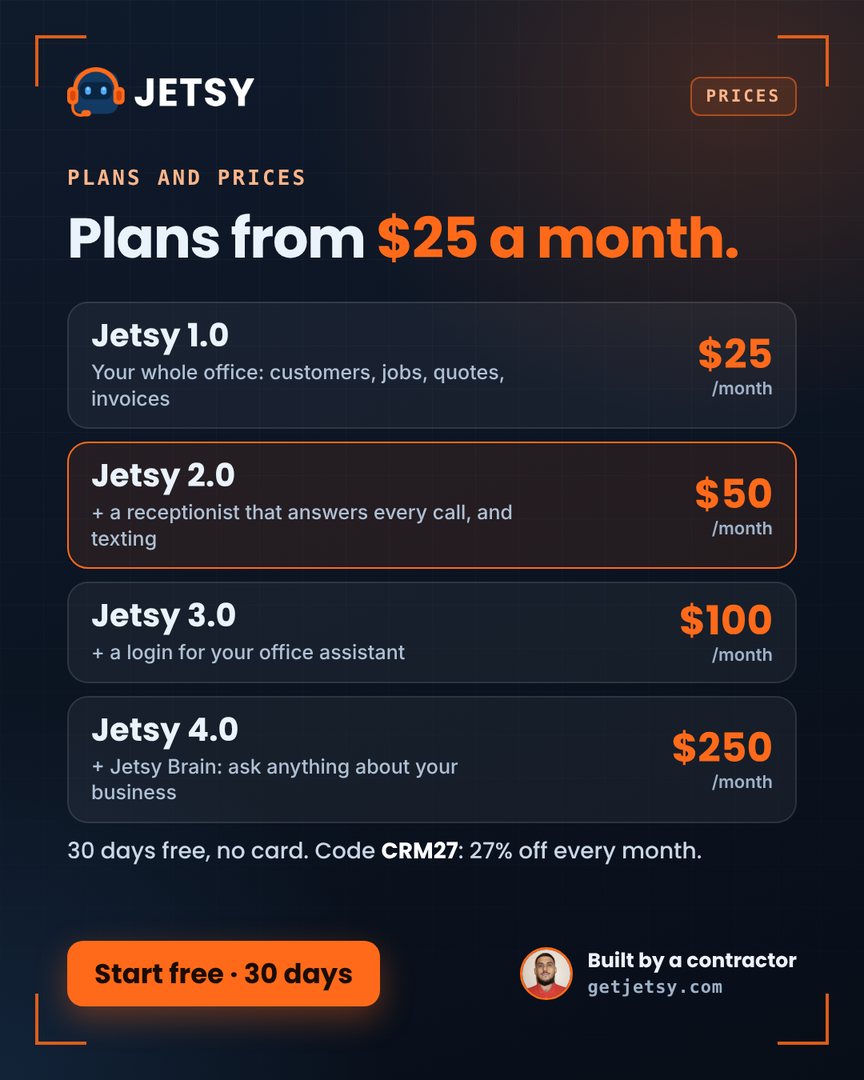
Start with the office. Add the rest when you want it.
Month to month, no setup fee, no contract. The phone, the website and the Brain are optional.
$25/month
The whole office
- Proposals, customers, jobs, quotes and invoices
- Price book, so every job is priced the same way
- Before and after photos on quotes and invoices
- Card payments and deposits, straight to your bank
- Online booking page for your customers
- A free website, free hosting on your-name.getjetsy.com
- Calendar, routes, crew and crew pay
- Crew time clock, timesheets and a payroll file
- Five stars after the job, then your Google review link
- Come-backs become leads by themselves
- What changed, with Undo
- You answer your own phone
$50/month
And a phone that answers (optional)
- Everything in Jetsy 1.0
- Answers every call, day or night
- Takes the address and books the visit
- English and Spanish, no upcharge
- 100 call minutes a month, then 25¢ a minute
- The receptionist is optional. Skip it and answer your own phone
- Two-way texting with customers, English and Spanish
- A missed call gets a text back
- The day-before reminder asks YES or NO
$100/month
And a login for your office assistant
- Everything in Jetsy 2.0
- A login for your office assistant
- Inventory and purchase orders
- 500 call minutes a month, then 25¢ a minute
$250/month
And Jetsy Brain
- Everything in Jetsy 3.0
- Ask anything about your business, answered from your own numbers
- Bank feed and test calls
- 1,000 call minutes a month, then 25¢ a minute
Swipe to see every package →
Card payments use your own Stripe account; Stripe’s card fee applies.
Jetsy was built by a painting contractor for his own company. Pick a time that works and he will call the number you leave.
Call or text 7 days a week, 7am to 7pm Arizona time.
See it with your own trade.
Put your next job on Jetsy tonight. It takes about ten minutes to set up.
No card for the free trial. 60-day money-back. No contract. Code CRM27 takes 27% off every month you stay.